
Get paid to react out loud.
Record your phone screen for three minutes while you look at a website for the first time, talking the whole way through. No survey, no sign-up, no account.
What you’ll do · about ten minutes
-
Turn the microphone on
Open Control Center and press and hold the screen-record button. Don’t just tap it. A normal tap records with the mic off, and a silent video can’t be paid for.
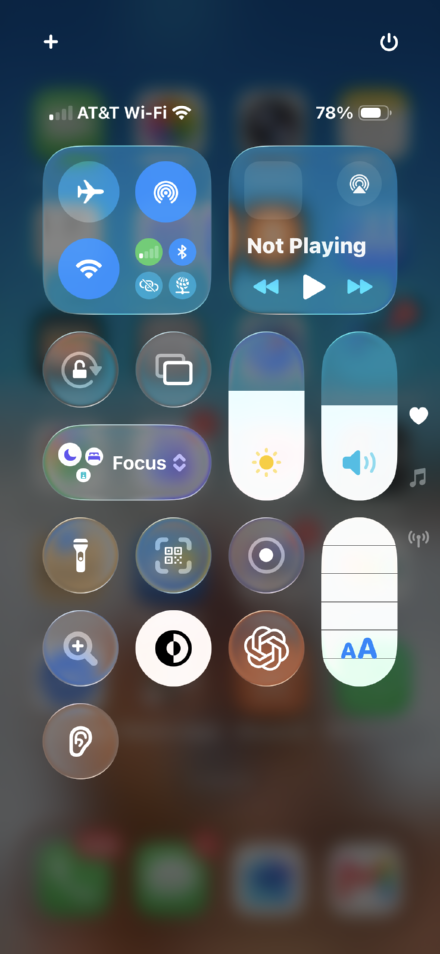
1. Press and hold the circled button. 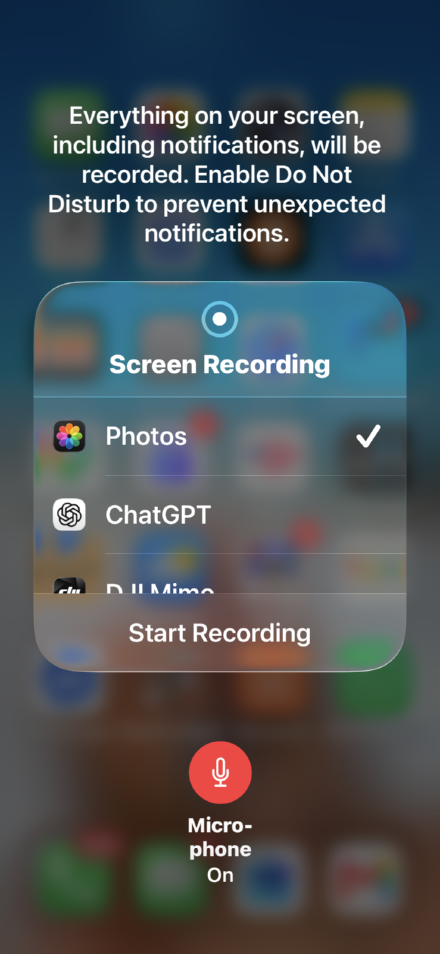
2. Check Microphone On and Photos ticked. Two things on that second screen. The mic circle must be red and read Microphone On. And Photos must have the checkmark. If another app is selected, the recording won’t save to your camera roll and you won’t be able to upload it.
Swipe down for Quick Settings and tap Screen recording. Before it starts you get a short Start recording? box. That box is the whole job: make sure Record microphone sound is switched on.
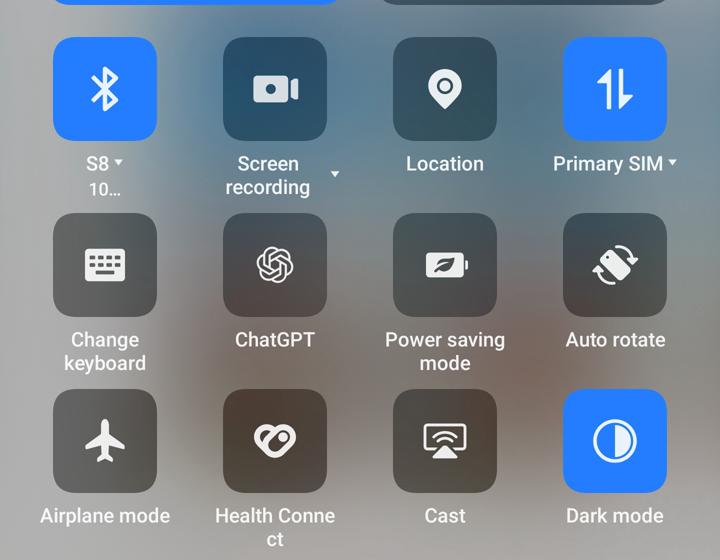
1. Tap Screen recording in Quick Settings. 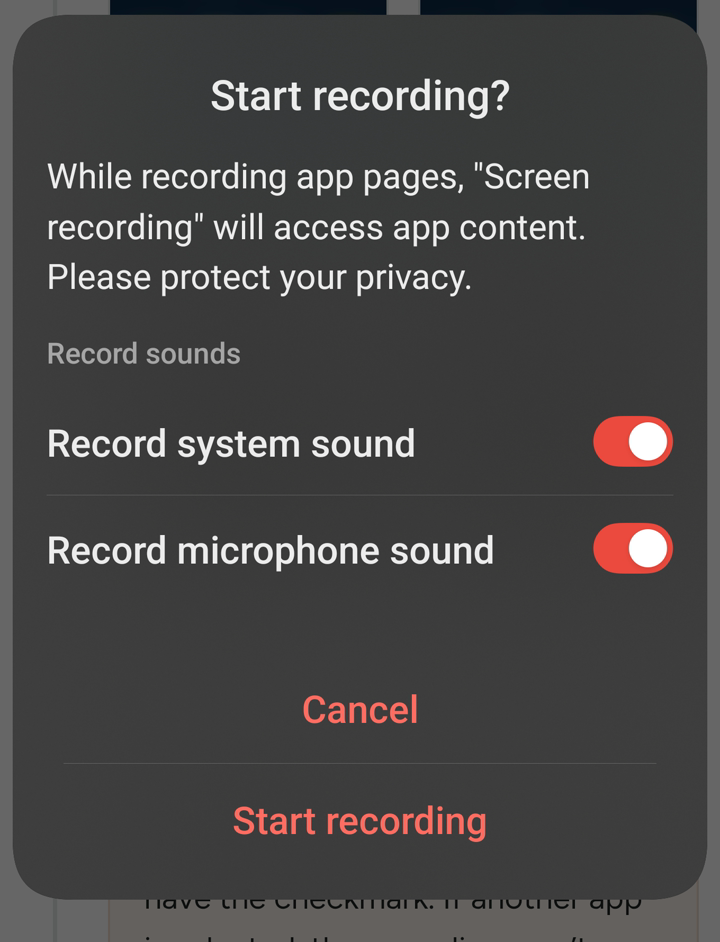
2. Microphone on. Turn system sound off. The wording is slightly different on every phone. Look for microphone in that box and make sure it is on. If the box has a system sound switch as well, turn that one off. We want your voice, not the website’s audio, and it makes your recording easier for us to use.
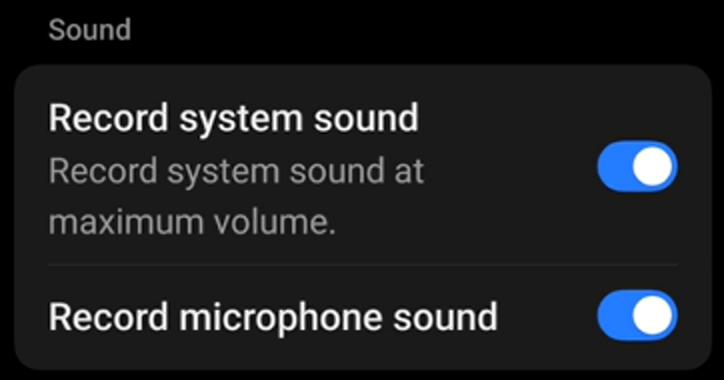
Both are usually on to start with. Note what system sound actually does: it records the site at maximum volume, which talks over you. Some phones also offer Partial screen recording. Don’t use it. Record the whole screen.
Turn on Do Not Disturb first. Your notifications get recorded too.
-
Do a ten-second test
Record ten seconds of yourself saying anything, stop, play it back. Can you hear your own voice? If not, go back to step one. You missed the long-press. If not, go back to step one and check the microphone switch in the box that appears before recording starts.
-
Read this once, then start recording
Imagine there’s something you’ve been putting off for weeks. Not because it’s hard, but because you cannot make yourself start it. You land on this site looking for something that might help. Explore it properly to work out what it offers and whether it’s for someone like you. Decide whether you’d take the next step it suggests, or not.
Tell us: in your own words, what does this product do and who is it for? And would you move forward, and what, if anything, makes you hesitate?
Don’t just scroll. Kick the tires. Reading the first screen and scrolling to the bottom is not a review, and we can’t pay for it.
This is a single page, so read all of it, top to bottom. There is a little animated conversation near the top that plays by itself: watch it, then say out loud what you think it just showed you, before you read the words around it. Tap the main button and see where it takes you. Go back and try something else. Poke at anything that looks interesting, and say out loud what you expected to happen before you tap, then whether that’s what actually happened. Somewhere there is a price. When you find it, say whether it seems fair to you and why. Do not type your email address in anywhere. Tell us whether you’d hand it over, but don’t actually do it.
-
Start recording, then open the site
Tap this once you’re recording. When you’ve finished talking, hit Back in Safari to come straight back here and upload.
Open the websiteOn a computer right now? and open it on your phone.
Three minutes minimum, five maximum. Keep talking, especially when you’re unsure.
If you go quiet, fall back on these:
- What do I think this actually is?
- Who is it made for? Someone like me?
- What would I click next, and why?
- I expected that button to do X. Did it?
- Is there anything here I don’t trust?
-
Hit Back, stop recording, upload below
Safari’s Back arrow returns you to this page. Then stop the recording and upload it.
Send it to us
Upload your recording
Opens your camera roll. Stay on wifi and keep this screen open while it uploads.
iPhone will ask where to look. Tap Photo Library.Pick the recording from your Gallery or Photos.
Got it. Thank you.
We’ll review your recording and send payment within 24 hours of approval. If anything’s wrong we’ll email you rather than just going quiet.
One more thing. If you’ve got a website of your own, there’s something for you at the bottom of this page.
What we can’t pay for
- No audio, or your voice can’t be heard
- A recording made on anything other than a phone. iPhone or Android are both fine, a desktop screen recording is not
- Scrolling in silence instead of talking
- Only scrolling the first page. We need you to click into the menu and the other pages
- Under three minutes
- You didn’t look at the page you were asked to look at
- More than one recording from the same person, or a second recording under a different name
- You are outside the United States. We can only pay reviewers located in the US, because our customers need reactions from their own market. A VPN does not change this and we do check
Everything else is fair game. Your value as a reviewer lies purely in your honesty, that means we want good as well as bad feedback. Pure honesty, and thinking out loud will make your review more useful to developers and founders.
Not here to review? Read this bit.
Have a website you’re getting crickets on?
That’s what we do. Real people record themselves using your site for the first time, saying exactly what they think, so you can finally see why visitors leave. Leave your email and we’ll tell you the moment it opens.